1. Install
Plug your NodeMCU ESP32 into this computer with USB, then click the button. Works in Chrome or Edge on a computer.
Can't connect? Hold the BOOT button on the board while you click Install. Installing erases the board.
2. Wire it
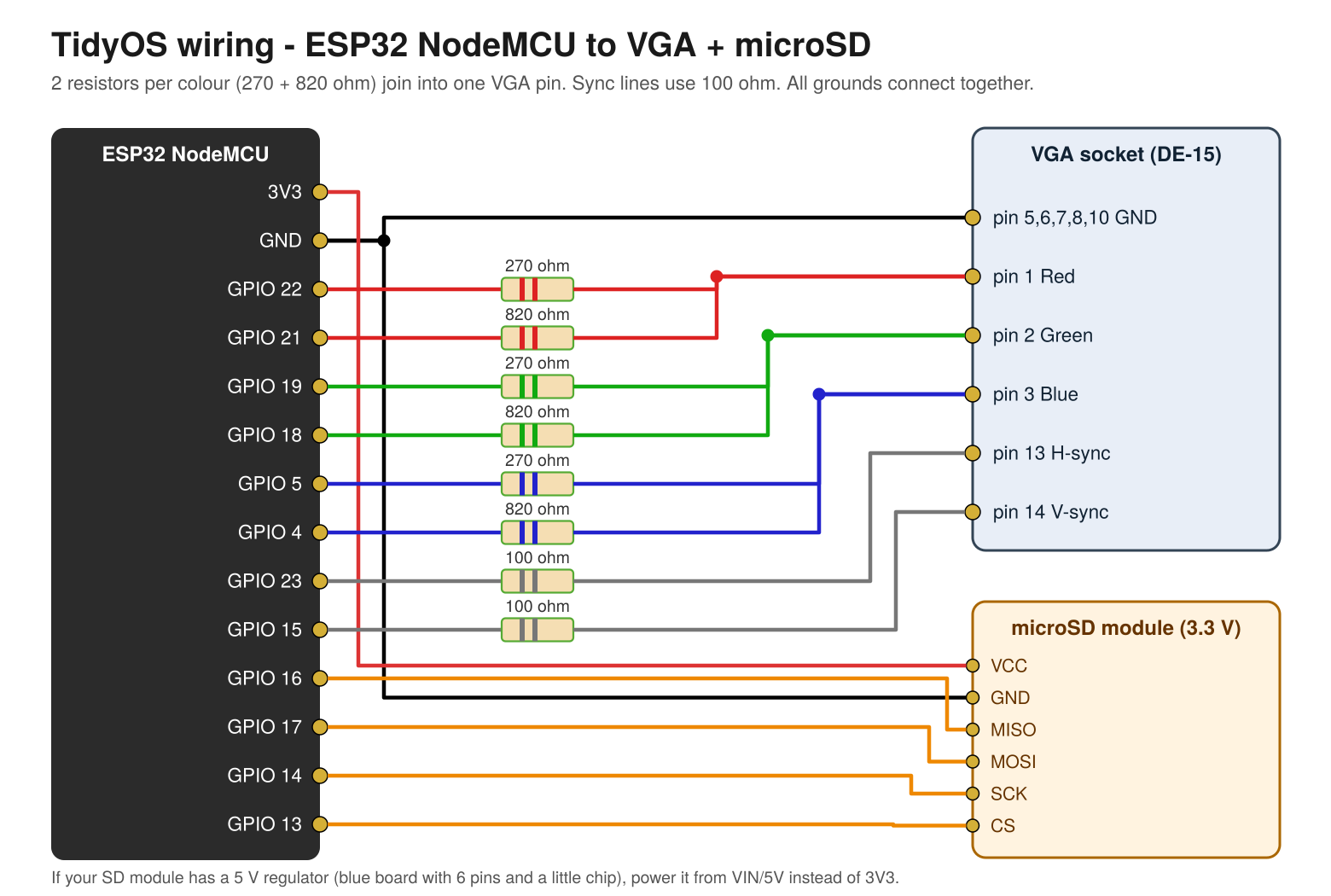
| ESP32 | Through | To |
|---|---|---|
| GPIO 22 / GPIO 21 | 270 Ω / 820 Ω | VGA pin 1 (red) |
| GPIO 19 / GPIO 18 | 270 Ω / 820 Ω | VGA pin 2 (green) |
| GPIO 5 / GPIO 4 | 270 Ω / 820 Ω | VGA pin 3 (blue) |
| GPIO 23 | 100 Ω | VGA pin 13 (H-sync) |
| GPIO 15 | 100 Ω | VGA pin 14 (V-sync) |
| GND | – | VGA pins 5, 6, 7, 8, 10 and SD GND |
| GPIO 16 / 17 / 14 / 13 | – | SD MISO / MOSI / SCK / CS |
| 3V3 (VIN for 5 V modules) | – | SD VCC |
3. First start
- Put your Bluetooth keyboard in pairing mode. TidyOS connects to it automatically.
- Then put your Bluetooth mouse in pairing mode.
- Open Settings, find your Wi-Fi, type the password, then Connect and Save.
Bluetooth LE keyboards and mice only. With no Bluetooth device you can type in a serial monitor at 115200.
Apps
Calculator · Neat Lite (writing, spell check) · Tidy Lite (spreadsheet) · Ready Lite (to-do) · Steady Lite (bills) · Rugged Lite (grid-down guide) · Messages (The Shelf + Coms mesh) · Browser · Files · Settings · System
Printing: network printers (found automatically), through a Pi with CUPS, or Save as PDF.
Wi-Fi file sharing: one switch, then copy files to and from the SD card from any browser.
Games: Sammy the Snake · Minesweeper · Blocks · 2048
For better web pages, run helper/tidyos_proxy.py on a Raspberry Pi and enter its address in Settings → Browser.
See the README for everything else.